Recent Posts

Pages: 1 ... 8 9 [10]
91
Time Master Problems and Support / Floating point formatting errors in invoices
« Last post by paulr on February 19, 2019, 09:28:18 am »
Since I've been using Time Master I've noticed many occasions where it struggles to round floating point numbers correctly, displaying figures like £8.299999999999989 instead of £8.30. This is tolerable when it only occurs on-screen, but now I'm using the invoicing module, it's embarrassing to be sending out invoices formatted like that. Is this ever going to change?
92
This is happening on my new XSMax.  ???
I do not see Time-Master in the notifications area.

[updated by edl867]
 :D
I was able to get badges back by:

1. backing up and syncing database
2. delete app from the phone
3. reinstall from App Store.
4. on first run it asked if it was allowed to send notifications.
5. restore database.

Thanks
93
Time Master Sync Module / Re: Sync Speed
« Last post by Adam on December 10, 2018, 10:26:25 am »
I know syncing is a complex process, but is there any way to improve its speed? I enter time entries on both my pc and my phone all the time and it's a touch cumbersome to make sure they're both running, then press sync, then accept the request and then wait...and wait.

Is it possible only to sync the entries that are new or changed?

It cannot do that.  It does build a list of all the items to check for syncing.  It does not send any items that it confirms are in sync, thus saving time.  It does have to check everything because you may be syncing to a new device.  Say for example you picked up a new iPad or device that you hadn't synced in several months or years, it would have to know what items do not exist on it while syncing.

Quote
Is it possible to have a default "accept sync request from certain devices"?

Currently we are not not doing any "new" development to the app.  We will add your request to our wishlist, in case we do have time to look at thing at some point in the future.  We will continue to maintain it for any issues that pop up from OS updates that cause issues.

Quote
Is it possible to have the windows app have a background service (optional) so if my computer is on, but the app isn't running, it will accept the request? Possible on the Android app?

No, because if the app is not running in the foreground, Apple does not let it communicate via WiFi or Bluetooth.  I don't know if Android allows it or not, but as mentioned above, we are not adding any new features at this time.

Quote
Is it possible to have backup to Dropbox run automatically at periodic intervals, instead of just getting a reminder?

Apple does not allow lengthily processes in the background, so no this is not possible.
94
Time Master Sync Module / Sync Speed
« Last post by rogerinnyc on December 06, 2018, 03:06:33 pm »
I know syncing is a complex process, but is there any way to improve its speed? I enter time entries on both my pc and my phone all the time and it's a touch cumbersome to make sure they're both running, then press sync, then accept the request and then wait...and wait.

Is it possible only to sync the entries that are new or changed?

Is it possible to have a default "accept sync request from certain devices"?

Is it possible to have the windows app have a background service (optional) so if my computer is on, but the app isn't running, it will accept the request? Possible on the Android app?

Is it possible to have backup to Dropbox run automatically at periodic intervals, instead of just getting a reminder?

Thanks for listening
95
Time Master Problems and Support / Re: Error code 0x803F8001
« Last post by Adam on November 30, 2018, 03:08:10 pm »
You are posting a Windows question in the Mac OS section.  I had moved the other post to the Windows section.  Please look there.
96
Time Master Problems and Support / Error code 0x803F8001
« Last post by JcTcom on November 28, 2018, 02:36:14 pm »
I am receiving the following message when trying to open Time Master on my Windows 10 notebook:
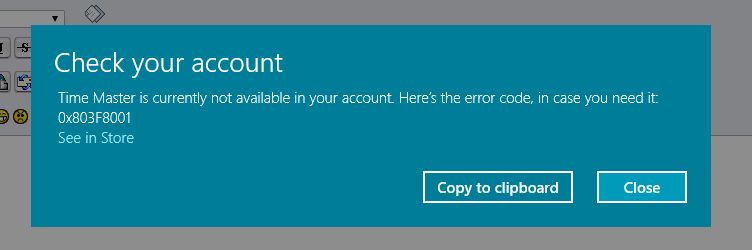
 Time Master is currently not available in your account. Here’s the error code, in case you need it: 0x803F8001

I have been using Time Master on that notebook for quite a few years now and it is essential to my billing process.  Without it I am dead in the water.

Here is a screenshot of the error:


This may end up getting posted twice as for some reason I could not find it after posting it the first time?

Carl
97
I'm not sure what that error is.  Never seen it before, but it is some warning from Microsoft.  When people write us that the app launches and immediately quits, what we recommend to do is log out of the MS App Store and log back in.  That always seems to work.  For this issue, I would try the same thing.  Make sure you are connected to the internet and logout of MS App Store and then back in.
98
For some reason today I am getting this error when trying to open Time Master on my Notebook.  I have been using it for years now and have purchased the sync module as well as the Quick books module.  now I can't get into it at all.

Here is a screen shot of what I get when I try to run it:


Any help much appreciated.  I am dead in the water as far as billing till I get this working!

Carl.
99
Time Master Invoice Module / Re: Clients not showing up as Statement options
« Last post by McGibbs on November 24, 2018, 02:59:37 pm »
Problem solved! Thanks so much.  :D
100
Time Master Invoice Module / Re: Clients not showing up as Statement options
« Last post by Adam on November 22, 2018, 11:21:39 am »
It shouldn't matter if you moved them from one Company to another.  However you may want to review some of your settings.  Setup -> Invoicing -> Statements.  Make sure to tick off things like "Include Paid Invoices" and try setting the "Paid Cutoff" to maximum (365 days) and see if that helps?
Pages: 1 ... 8 9 [10]